
planHQ
Turn messy emails into structured project plans in seconds.
Tagline
Turn email chaos into project plans
For people who inherited work, not methodology.
From email threads to a plan you can run.
Project intake for teams living in email and Excel.
The project skeleton generator for people who inherited work, not methodology.
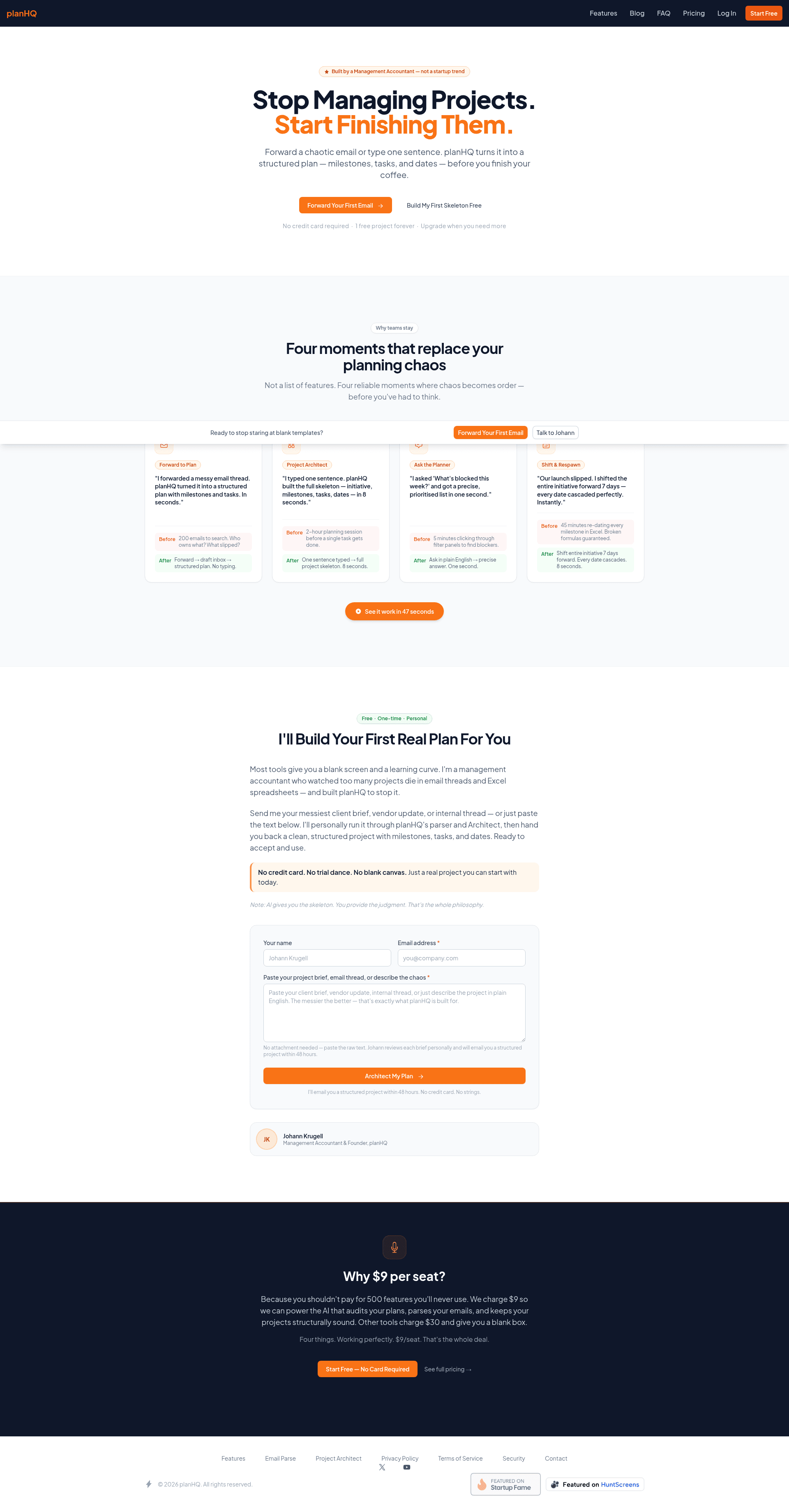
The page repeatedly calls out "accidental managers" and focuses on starting from messy input rather than teaching project management theory.
An alternative to blank project templates, Excel dependency chaos, and email-thread archaeology.
The strongest contrast on the page is against blank canvases, Excel sheets, and searching through 200 emails; those are the real alternatives users are trying to escape.
The fastest way to go from a client brief to a plan you can actually act on.
Forward-to-plan and one-sentence architect flows are specifically designed for intake-to-execution, not long-term enterprise portfolio management.
Primary user
Accidental project managers at small agencies, consultancies, and cross-functional teams who coordinate work in email and Excel
ICP #1
Client Services Manager at a 10-50 person agency
Pain
Project information lives across long email threads, and every new client brief starts from scratch in Excel or a blank template.
Why this solves
planHQ turns pasted or forwarded email chaos into a usable plan with milestones, tasks, and dates, which is exactly the first mile of their workflow.
ICP #2
Operations Lead at a services business running multiple cross-functional initiatives
Pain
Weekly status checks require manually digging through filters, spreadsheets, and meeting notes to find blockers and dependencies.
Why this solves
The "Ask the Planner" workflow gives them a plain-English way to surface blockers and priorities without hunting through tools.
ICP #3
Founding team member or non-PMO manager responsible for a launch timeline
Pain
Launch dates slip constantly, and re-dating every milestone in Excel is slow, fragile, and error-prone.
Why this solves
The initiative shift feature cascades dates automatically, which removes one of the most annoying parts of managing schedules by hand.
Strengths
- +The page has a very clear enemy: blank canvases, Excel, and email threads, which makes the message easy to understand fast.
- +The four named moments create memorable use cases instead of a feature dump.
- +The founder-led trust angle is strong because Johann Krugell’s management accountant background feels grounded and non-hypey.
Weaknesses
- −The product category is still a little fuzzy; is this project management, intake automation, or planning copilot? The page hints at all three without locking one in.
- −There is almost no visual proof of the actual UI or output quality beyond claims, so the landing page is making users imagine the product.
- −"Four things. Working perfectly." is a bold claim that can backfire if any workflow feels incomplete or brittle.
- −The page leans heavily on copy and founder story, but doesn’t show enough concrete artifacts like sample plans, task hierarchy, or before/after screenshots.
- −The phrase "utility-first project hub" is not how buyers describe the problem in their own words; it sounds branded, not customer-native.
Fix these
- Show a real example: email thread on the left, generated milestone/task plan on the right, with dates and assignees visible.
- Make the category explicit with one sharper line, such as "Project intake and planning for teams that live in email and Excel."
- Add 2-3 sample outputs for different inputs: vendor delay, client brief, launch plan, so users can see pattern coverage.
- Replace some of the abstract branding language with concrete outcomes like "turn a brief into a 10-task plan in under a minute."
- Add trust proof around accuracy and limits: what it parses well, what it doesn't, and how users edit or approve the skeleton.
Drop-in replacement copy
Headline
Turn email chaos into plans
Forward the brief. Get milestones, tasks, and dates.
Start from the mess, not a blank page
Forward an email thread or paste a rough brief and planHQ turns it into a structured project skeleton. You get a real starting point instead of staring at an empty template.
Ask what’s blocked without digging through tools
Use plain English to check status, surface blockers, and spot what needs attention this week. It’s faster than searching through inboxes, spreadsheets, and meeting notes.
Move the whole project without breaking dates
Shift an initiative forward by days and the milestones cascade automatically. No manual rework, no fragile spreadsheet formulas, no missed dependencies.
See the output before you commit
Use the live demo with a temporary email address and try it before signing up. If you like it, keep going on the free forever plan with one project.
FAQ
Is this project management software?
Not really. It’s project intake and planning for teams that start in email and Excel, then need a usable plan fast.
What kind of input works best?
Messy email threads, rough briefs, vendor updates, launch notes, and one-sentence project ideas. The more context you give it, the better the skeleton.
Can I edit the plan after it’s generated?
Yes. The output is a draft, not a lock-in. You can review, adjust, and use it as the working plan.
Does it replace Asana, monday, or Notion?
No. It handles the painful first mile: turning chaos into structure. You can export or move the plan into your existing workflow after that.
Is there a free plan?
Yes. Free forever for 1 project, no credit card, and a live demo if you want to test it first.
Email threads are terrible project plans. So I built planHQ. Forward a messy brief. Get back milestones, tasks, and dates in seconds. No blank canvas. No credit card. No PM jargon. If you manage work in email + Excel, this is for you.
Most project tools start too late. By the time you open Asana or Notion, the work is already buried in email. planHQ starts where the mess starts: forwarded threads, one-sentence briefs, and “what’s blocked this week?”
I kept seeing the same ugly pattern: - brief comes in by email - someone copies it into Excel - dates get redone by hand - blockers get lost in Slack planHQ exists to kill that first mile. Not PM theory. Just a plan from chaos.
Built a live demo before polishing features. Why? Because people don’t need a tour. They need to see their own messy input turn into something usable. Temporary email in. Structured project plan out. That’s the whole pitch.
If your launch date slips weekly, you know the pain: move one milestone and suddenly you’re editing 14 cells in Excel. planHQ shifts the whole initiative forward and cascades dates automatically. Less spreadsheet surgery. More shipping.
Blank templates are a lie. Nobody starts a client project with perfect scope. They start with a messy email, a half-brief, and a deadline. planHQ turns that into the first workable plan instead of another empty doc.
Forward one email. planHQ parses the thread and drafts: - initiative - milestones - tasks - dates Then you can ask: “What’s blocked this week?” It’s the fastest way I’ve found to go from chaos to a real plan.
Watch dates cascade automatically. Move the launch by 5 days and planHQ shifts the whole initiative. No manual rework. No broken dependencies. No “wait, which tasks were tied to that milestone?”
The first users all said the same thing: “Finally, a starting point.” That’s the job here. Not replacing your whole stack. Just turning the ugly intake stuff into a plan you can actually use.
People don’t want more PM software. They want: - less inbox archaeology - fewer broken spreadsheets - a plan they can trust That’s why planHQ is free forever for 1 project. Try it on your mess.
Angle: accidental managers and inherited work
Most project management tools assume you started with a clean brief. That’s not how work actually starts. If you’re a client services manager, ops lead, or founder, the real workflow is usually: - a messy email thread - a vague deadline - a spreadsheet someone built under pressure - a meeting where everyone agreed to “circle back” That’s why I built planHQ. It turns messy inputs into a structured project skeleton: milestones, tasks, and dates. Not because people need another dashboard. Because they need a first draft of the plan. Forward the thread. Paste one sentence. Ask “what’s blocked this week?” Then move the initiative and let the dates cascade automatically. I’m betting the biggest wedge in project management is not execution. It’s intake. If you inherit work instead of designing workflows, this is for you.
Angle: anti-blank-canvas positioning
Blank templates are overrated. Nobody hands you a pristine project brief and says, “Here, build the plan from scratch.” Usually it’s: - an email chain - a late-night Slack message - a client asking for “a rough timeline” - an Excel sheet that has already become a liability planHQ is for that moment. Paste in the chaos and it turns into a usable project skeleton with milestones, tasks, and dates. That’s the whole thesis: stop starting from zero. Start from the mess. I think there’s a big category hiding here between project management, intake automation, and planning copilots. But for users, the job is simple: turn the thing they already have into the plan they wish they had. If your team still starts projects in email and Excel, I’d love to know what breaks first.
Angle: concrete workflow and founder credibility
I’m building planHQ around one very specific workflow: turn a chaotic brief into a plan you can act on. Not a generic AI chatbot. Not a giant PM suite. Not another blank page that expects you to do all the work. The core use cases are: - forward an email thread and get a project draft - type one sentence and get milestones, tasks, and dates - ask plain-English questions like “what’s blocked this week?” - shift the whole initiative forward without editing every date by hand That’s it. I think this matters because a lot of accidental managers don’t need methodology. They need relief. If you’re coordinating launches, vendor work, or client projects across email and spreadsheets, I’d love feedback on the output quality. Does the plan feel like a useful starting point, or just AI-shaped noise? That answer decides everything.
No visuals for this kit yet.
Tagline
Project plans from messy email threads
Description
Forward an email thread or paste one sentence, and planHQ turns it into milestones, tasks, and dates. Built for accidental managers who live in email, Excel, and too many status updates.
Maker's first comment
I built planHQ because I kept watching the same thing happen: a project starts in email, gets copied into Excel, then slowly turns into a mess of manual date changes and lost context. The actual hard part isn’t execution software — it’s getting from chaos to a first usable plan. planHQ is my attempt to fix that first mile. You can forward a thread, paste a brief, or ask a plain-English question like “what’s blocked this week?” and get back a structured project skeleton you can work from. There’s also a simple shift feature for moving an entire initiative forward without editing every milestone by hand. I’m sharing it early because I want to learn where the output feels genuinely useful and where it still feels brittle. If you try it, tell me whether the plan quality is good enough to trust, and what you’d need before you’d use it on a real client or internal project.
Pinned maker comment
Would love feedback on two things: 1) does the generated plan feel usable on real messy input, and 2) is the category message clear enough in the first 10 seconds?
Meta
Targeting agency managers buried in email
Hypothesis: client services managers at 10-50 person agencies will click when they see their real workflow — messy email threads turned into a project skeleton. planHQ takes forwarded briefs, builds milestones/tasks/dates, and helps you answer blockers in plain English. Built for teams that still start in Outlook, Gmail, and Excel.
Google Search
Project planning from email threads
Hypothesis: people searching for project intake, brief-to-plan, or Excel replacement tools want something that starts from messy input instead of a blank template. planHQ turns email threads and one-line briefs into structured plans with dates that cascade when timelines move.
Reddit Promoted
For managers tired of spreadsheet surgery
Hypothesis: ops leads and accidental PMs in service businesses will respond to a utility that saves time on the first mile of project planning. planHQ turns messy briefs into milestones, tasks, and dates, then lets you shift the whole initiative without editing every cell by hand.
Subreddits
r/SideProject
Show the before/after of a messy email thread becoming a real plan, with a short build story and the live demo.
Rules: Be transparent that it’s your product, show product + lesson, avoid pure promo.
r/indiehackers
Share the problem discovery: accidental managers hate blank templates and manual date updates more than they hate PM software.
Rules: Focus on learnings, metrics, and build process; self-promo is tolerated when framed as a story.
r/microsaas
Post the narrow wedge: intake-to-plan for small agencies and ops teams, not generic project management.
Rules: Keep it tactical, include screenshots or a demo gif, and avoid grand positioning.
r/EntrepreneurRideAlong
Talk about building a tool for the exact workflow of agency/client-service work and invite feedback on the category.
Rules: No hard selling; share progress, numbers, and what you learned from early users.
r/smallbusiness
Frame it as a practical fix for small teams managing projects in email and spreadsheets.
Rules: Lead with the problem and value, keep it useful, and respect promo/self-promo guidelines carefully.
Communities
Post weekly build updates, customer learnings, and the exact workflows you’re validating. Comment on other founders’ threads before posting your own.
Share a specific workflow improvement for client services teams and ask for screenshots of how they currently manage kickoff briefs.
Offer a live teardown of a real messy brief into a plan, then ask for feedback on output quality and UX friction.
Cold outreach template
Hey {firstName} — saw {context} and it looked exactly like the kind of messy intake planHQ is built for. If you want, I can turn one real brief or email thread into a clean project skeleton for you. No signup needed — just send the mess.
Product Hunt timing
Launch on Tuesday at 12:01am PT so you catch US West Coast early, Europe midday, and still have the full US workday to respond. That fits this ICP because accidental managers are mostly working hours buyers, not late-night consumer scrollers.
Indie Hackers post ideas
- 01I built an AI tool for the ugliest part of project management: the first email thread
- 02Why I stopped trying to build a full PM suite and focused on intake
- 03What happened when users pasted messy client briefs into planHQ
Competitor alternatives
Current tone of voice
Direct, anti-bloat, slightly rebellious, and pragmatic; for example: "Stop Managing Projects. Start Finishing Them." and "No credit card. No trial dance. No blank canvas."
Your kit is ready. Sign up free to unlock, takes 10 seconds.
7 more X posts · 2 LinkedIn · Product Hunt copy · ad hooks · 100-user playbook · landing critique