
SnapFound
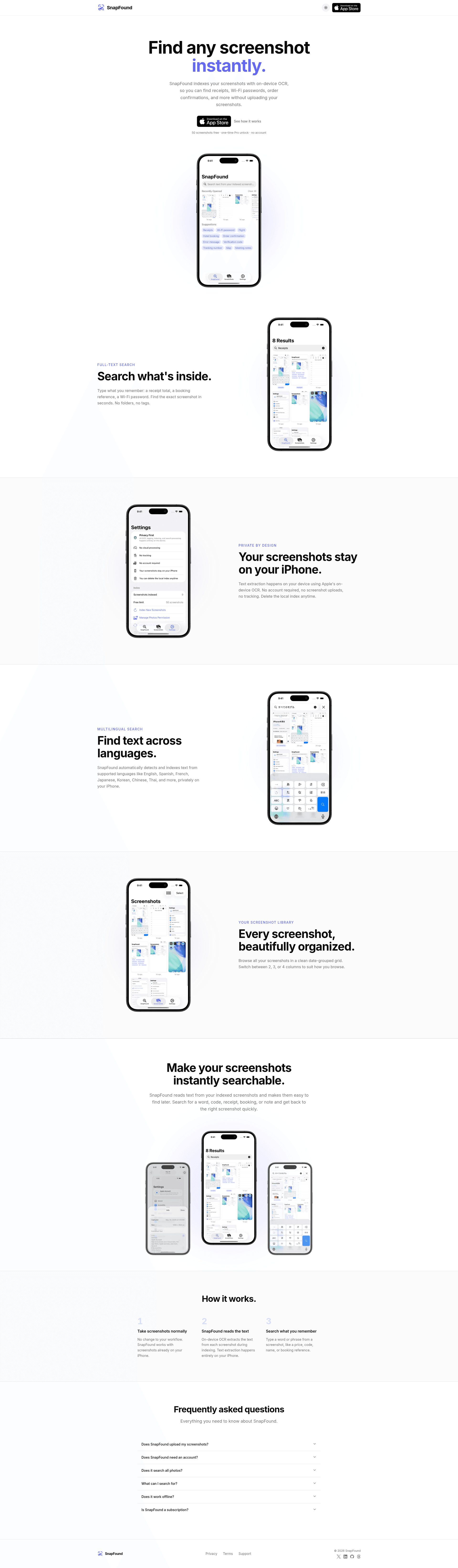
Search your iPhone screenshots instantly without uploading them.
Tagline
Find any screenshot in seconds
Your private screenshot search, on iPhone
Search receipts, passwords, and bookings locally
The screenshot finder for people who hate cloud apps
The fastest way to search the text inside your iPhone screenshots.
This is the clearest category claim because the product’s core behavior is OCR-based screenshot retrieval, not general photo management.
A private alternative to cloud photo search for people who screenshot sensitive information.
The page repeatedly emphasizes local processing, no uploads, and no tracking, which makes privacy the strongest differentiator against Google Photos and similar tools.
The screenshot search app for people who keep losing receipts, passwords, and booking codes.
The landing page is very specific about use cases like receipts, Wi‑Fi passwords, and order confirmations, so pain-killer framing will convert better than abstract productivity language.
Primary user
iPhone users who save receipts, confirmations, codes, and passwords as screenshots and constantly lose them in Photos
ICP #1
Busy iPhone power user who lives in screenshots for receipts, tickets, and password snippets
Pain
They know the information is in their camera roll, but waste time swiping through hundreds of screenshots to find one specific code or confirmation number.
Why this solves
SnapFound turns screenshots into a searchable database, so they can type a remembered word or number and get the exact screenshot in seconds.
ICP #2
Frequent traveler or logistics-heavy consultant who keeps travel confirmations in screenshots
Pain
When asked for a booking reference, gate change, or hotel confirmation, they have to hunt through Photos under pressure, often while offline or in transit.
Why this solves
Because indexing happens locally on the iPhone and works on screenshot text, they can find travel details quickly without needing cloud sync or an account.
ICP #3
Privacy-conscious iPhone owner who avoids cloud-backed photo scanning apps
Pain
They want searchability but do not want their personal screenshots uploaded to third-party servers or tied to an account.
Why this solves
SnapFound’s on-device OCR, no-account flow, and local index directly address the trust barrier that blocks them from using Google Photos-style search or other cloud tools.
Strengths
- +The value proposition is instantly understandable: search text inside screenshots, privately, on-device.
- +The page uses concrete examples like receipts, Wi‑Fi passwords, and booking references, which makes the use case feel real.
- +Privacy positioning is repeated consistently across headline, sections, and FAQ, which reduces trust friction.
Weaknesses
- −It under-explains the actual workflow: does it scan the whole screenshot library automatically, how fast is indexing, and how are results ranked?
- −The product is positioned too broadly for a niche utility; it does not strongly separate itself from Apple Photos search or Google Photos for users who already assume screenshot OCR exists.
- −There is no proof of performance, scale, or accuracy, so the page asks for trust without giving evidence.
- −The pricing copy is underdeveloped; "50 screenshots free · one-time Pro unlock · no account" is good, but it does not explain what Pro costs or what unlocks.
- −The FAQ is visible as questions only in the scraped text, but the answers are not surfaced on the landing content, which leaves key objections unresolved.
Fix these
- Add a side-by-side comparison against Apple Photos and Google Photos focused on privacy, search depth, and screenshot-specific UX.
- Show a 10-second demo GIF of typing a booking number or receipt total and jumping to the right screenshot.
- Quantify benefits with hard claims if true: indexing speed, search latency, supported languages count, and how many screenshots it can handle locally.
- Surface pricing upfront with a clear Pro CTA, including the exact one-time price and what features unlock.
- Reframe the hero for the primary job-to-be-done: "Find receipts, passwords, and confirmations in your screenshots" rather than the more generic "Find any screenshot instantly."
Drop-in replacement copy
Headline
Find screenshots by text
Search receipts, passwords, and confirmations locally on your iPhone.
Find the exact screenshot fast
Type a word, number, total, or code and jump straight to the right screenshot. No more scrolling through hundreds of images to find one receipt or booking reference.
Keep everything on your iPhone
SnapFound uses on-device OCR and a local index, so your screenshots are never uploaded. There’s no account to create and no cloud sync to trust.
Search in the language you used
Find text in screenshots across English, Spanish, French, Japanese, Korean, Chinese, and Thai. Useful when your screenshots mix languages, names, or travel details.
Browse screenshots your way
See your library grouped by date and switch between 2, 3, or 4-column grid views. It’s a cleaner way to scan old screenshots when search isn’t enough.
FAQ
Does SnapFound upload my screenshots?
No. Indexing happens on your iPhone, locally. Your screenshots stay on your device.
Do I need an account?
No account is required. Open the app and start searching.
How many screenshots can I search for free?
You can index and search 50 screenshots for free. After that, there’s a one-time Pro unlock.
Can I delete the OCR index?
Yes. The local index is deleteable at any time if you want to remove the stored OCR data.
What kinds of screenshots does it work best on?
It works best for screenshots with visible text like receipts, boarding passes, booking references, passwords, order confirmations, and notes.
I built SnapFound because iPhone screenshots are basically a hidden database. It indexes the text inside your screenshots on-device, so you can search receipts, Wi‑Fi passwords, confirmations, and codes without uploading anything. Your screenshots stay on your iPhone.
Apple Photos is fine for albums. It’s terrible when you need that one receipt total, booking reference, or password snippet fast. SnapFound searches the text inside screenshots locally, so you can find the exact one in seconds. No account. No upload.
I wanted screenshot search without the creepy part. So SnapFound uses on-device OCR and a deleteable local index. That means you can search your screenshots like text, but nothing gets uploaded to a server. If you keep sensitive stuff in screenshots, this is for you.
The best validation I got was simple: people immediately tried searching for receipts, boarding passes, and Wi‑Fi passwords. That told me the job is not "organize photos." It’s "find the thing I screenshotted 3 weeks ago in 2 seconds."
You know the information is in your camera roll. You just don’t know which screenshot. SnapFound turns your screenshots into a searchable library, so one remembered word or number gets you the right image fast.
Travel is where screenshot chaos gets expensive. Gate changes, hotel confirmations, boarding info, reservation codes — all buried in Photos. SnapFound finds the exact screenshot locally, even if you’re offline.
Search: "Hilton 4821" Result: the exact hotel confirmation screenshot. Search: "€43.20" Result: the receipt. Search: "wifi" Result: the password screenshot. This is what screenshot search should feel like.
Open SnapFound. Type a code, name, or total. It searches the text in your screenshots locally and jumps straight to the match. No waiting for cloud sync. No account wall. Just the screenshot you forgot you had.
The unexpected use case: People are using SnapFound to find Wi‑Fi passwords, order numbers, and login codes they saved months ago. That’s the real product-market fit signal. Not photo management. Relief.
A lot of people want screenshot search. Most don’t want their personal photos scanned in the cloud. SnapFound wins because it keeps the index local, lets you delete it anytime, and never asks for an account.
Angle: privacy-first utility for people who screenshot sensitive info
I built SnapFound after noticing a dumb but common habit: People save important information as screenshots. Receipts. Booking references. Wi‑Fi passwords. Order confirmations. Then when they need it, they scroll through Photos like it’s 2014 and pray they remember the filename. The obvious fix is search. But the obvious cloud approach has a trust problem. I didn’t want to build another app that uploads private screenshots to a server just so it can OCR them. So SnapFound indexes screenshots on-device using Apple’s local text extraction. That means: - no account - no screenshot uploads - a deleteable local index - multilingual text search It’s not a giant app. It’s a small tool that removes a very specific kind of friction. And honestly, those are the best products. They don’t ask users to change behavior. They make the existing mess searchable. If you’re curious, I’d love feedback on one thing: would you trust a local-only screenshot search app enough to make it your default?
Angle: clear pain-killer for travel-heavy users
There’s a very specific kind of stress I kept seeing in my own behavior and in other people’s: You’re at the airport, hotel desk, checkout counter, or on a call. Someone asks for a code, reference, total, or confirmation number. You know you screenshotted it. You just can’t find it fast enough. That’s the problem SnapFound is for. It searches the text inside your iPhone screenshots locally, so you can type one remembered word or number and get the exact screenshot back in seconds. It’s designed for the stuff people actually save as screenshots: - receipts - boarding passes - booking confirmations - client details - passwords and Wi‑Fi codes A lot of “productivity” software is really just organization for people with spare time. This is not that. This is a small utility for moments where speed matters. I’m shipping it with 50 screenshots free and a one-time Pro unlock because I hate subscriptions for tiny utilities. If you’re someone who lives out of screenshots, I’d love to know: what do you search for most often?
Angle: indie product story with positioning against cloud photo search
I keep seeing people assume their phone can already do this. In practice, screenshot search is still weirdly bad. Photos apps are built around albums, memories, and generic image search. SnapFound is built around one job: find the screenshot with the text you remember. That sounds small. It is small. And small is good when the pain is specific. The positioning that seems to resonate most is not “AI photo organizer” or “smart gallery.” It’s: Search receipts, passwords, and confirmations in your screenshots. Privately. On your iPhone. That’s the whole pitch. No account. No upload. No cloud trust issue. Just local OCR and a local index you can delete anytime. I think more indie products should lean into narrow utility instead of trying to sound broad and strategic. Users don’t wake up wanting a platform. They wake up wanting to find a thing. Would you want a side-by-side comparison between SnapFound, Apple Photos, and Google Photos? I’m thinking of adding one to the landing page.
No visuals for this kit yet.
Tagline
Private screenshot search on iPhone
Description
Search receipts, passwords, and booking codes inside your iPhone screenshots without uploading anything. SnapFound uses on-device OCR, no account, and a deleteable local index.
Maker's first comment
I built SnapFound because I was tired of knowing a receipt, booking reference, or Wi‑Fi password existed somewhere in my iPhone screenshots, but still wasting time scrolling through Photos to find it. The more sensitive the information, the less I wanted to upload it to a cloud app just to make it searchable. So I made a local-only screenshot search tool for iPhone: no account, no screenshot uploads, and a deleteable on-device index. It uses Apple’s local text extraction, so you can search by words, totals, names, or codes and jump straight to the right screenshot. The best early signal has been how quickly people start using it for the same few jobs: receipts, travel confirmations, and login-related screenshots. That’s the behavior I wanted to fix. I’d love feedback on the pricing, the onboarding flow, and whether the privacy message is clear enough without sounding paranoid.
Pinned maker comment
Looking for blunt feedback on two things: is the privacy-first positioning strong enough to beat Apple Photos/Google Photos for this use case, and does the pricing feel fair for a small, one-time utility?
Meta
Still hunting receipts in Photos?
Targeting iPhone users who save receipts, passwords, and confirmations as screenshots. Hypothesis: people will install a local-only search app if the ad names the exact pain and removes cloud trust concerns. SnapFound indexes screenshot text on your iPhone, so you can find codes, totals, and booking refs fast. No account. No uploads.
Google Search
Search iPhone screenshots locally
Targeting people actively looking for a way to search screenshots, receipts, or iPhone Photos text. Hypothesis: search-intent users convert on a privacy-first utility when the ad promises instant text search without uploading photos. SnapFound finds words, totals, and codes inside screenshots on-device.
Reddit Promoted
Lost a booking code in Photos?
Targeting r/iPhone and r/ios users who already save important info as screenshots. Hypothesis: direct pain framing will outperform generic productivity copy because this is a narrow utility with an obvious use case. SnapFound searches screenshot text locally on iPhone. No account. No upload. Delete the index anytime.
Subreddits
r/SideProject
Show the problem/solution with a short demo GIF: searching a booking reference or receipt total inside iPhone screenshots locally.
Rules: Must be a real side project with a build story; avoid pure promo, include what you learned or built.
r/indiehackers
Share the product decision story: why local-only OCR beats cloud photo search for sensitive screenshots.
Rules: Lead with the build process and lessons; self-promo is tolerated when it is educational and transparent.
r/microsaas
Position it as a tiny utility SaaS/one-time unlock for a very specific pain: screenshot search on iPhone.
Rules: Keep it product-focused, show clear value, and avoid spammy launch language.
r/iphone
Ask for feedback on whether people would use a private screenshot search app to find receipts, passwords, and confirmations.
Rules: Be useful first, ask for opinions, and do not dump a sales page.
r/ios
Highlight the on-device OCR workflow and the privacy angle for people who care about local processing on iPhone.
Rules: Discussion and utility posts perform better than obvious promotion; frame it as a workflow improvement.
Communities
Post the story behind the product, the pricing decision, and a screenshot of the search flow. Comment on other indie utility launches for a week before posting.
Share a short demo focused on a real iPhone pain: finding screenshots with receipt totals, codes, and passwords. Ask for workflow feedback instead of pitching hard.
Frame the post around local OCR and privacy. Keep it technical enough to be interesting, not a generic ad.
Cold outreach template
Hey {firstName} — saw {context} and thought of SnapFound. If you keep screenshots of receipts, codes, or bookings on your iPhone, it lets you search the text locally with no uploads or account. Want me to send you a free link?
Product Hunt timing
Launch on Tuesday at 12:01 AM Pacific Time. PH traffic is strongest early in the day, and Tuesday avoids the weekend noise while giving you a full weekday to respond to comments. For an iPhone utility, this timing also catches US and Europe early in their workday when screenshot pain is fresh.
Indie Hackers post ideas
- 01I built a local-only iPhone app to search screenshot text — here’s why cloud OCR felt wrong
- 02How I positioned a tiny utility around one painful job: finding receipts and booking codes in screenshots
- 03What I’d change about pricing a privacy-first iPhone utility after shipping a one-time unlock
Competitor alternatives
Current tone of voice
Clean, confident, privacy-first, and consumer-friendly, with direct utility language like "Find any screenshot instantly" and "Your screenshots stay on your iPhone."
Your kit is ready. Sign up free to unlock, takes 10 seconds.
7 more X posts · 2 LinkedIn · Product Hunt copy · ad hooks · 100-user playbook · landing critique