
Plexicle
A calm internet desk for saving, finding, and arranging anything you collect.
Tagline
Save first. Sort never.
A spatial library for the web.
The alternative to folders and bookmark sprawl.
Collect fast. Find anything later.
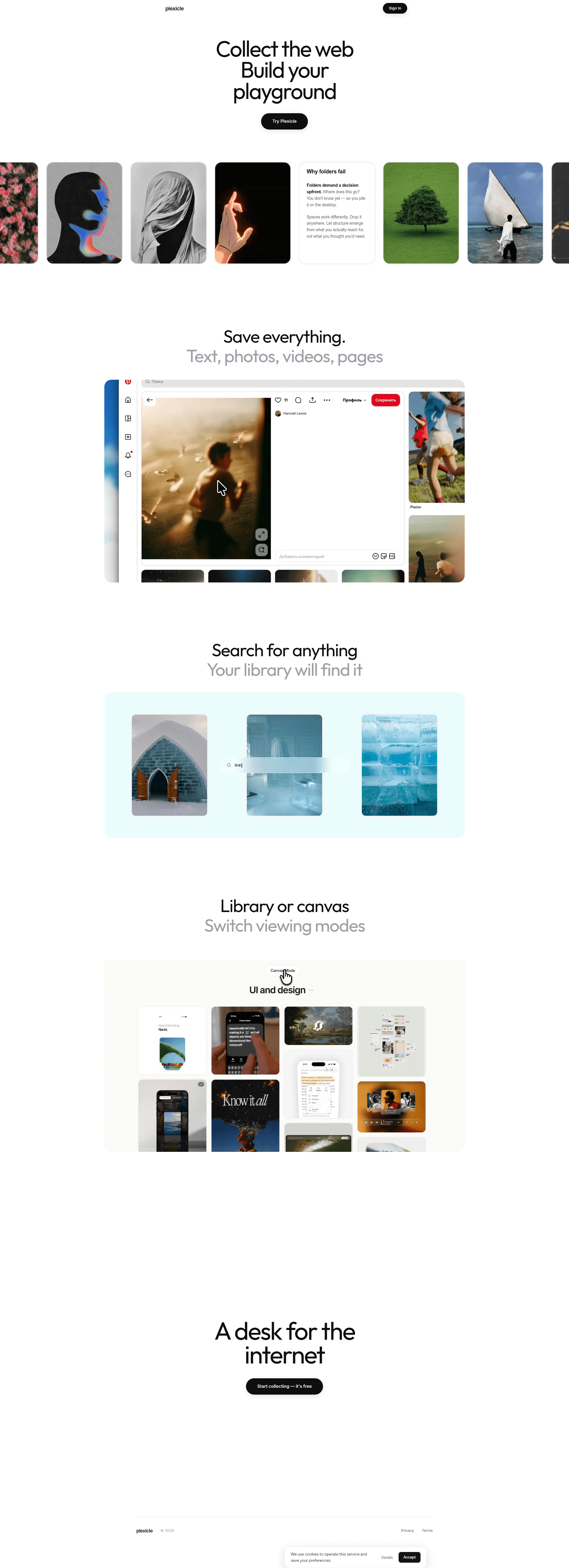
Plexicle is a spatial library for the web, not another folder-based bookmark manager.
The product clearly contrasts itself with folders and emphasizes canvas/library modes, which makes the category-defining angle around spatial collection credible and differentiating.
The alternative to folders, desktop dumps, and over-organized note apps.
The landing page directly attacks folders and the upfront decision problem; this anti-folder framing will resonate with users who already feel the pain of bookmark overload and desktop sprawl.
A save-now, organize-later tool for people who collect faster than they can categorize.
This is the strongest pain-killer angle because the page repeatedly says save first, sort never, and praises tools that stay at the periphery of attention.
Primary user
Knowledge workers who constantly save links and media for later but hate maintaining folders, especially designers, researchers, writers, and founders
ICP #1
Product designer at a startup who saves screenshots, articles, and interface references every day
Pain
They keep dumping inspiration into random folders, bookmarks, and desktop clutter because they never know the right category at save time.
Why this solves
Plexicle’s "save first, sort never" approach matches how designers actually collect references: fast capture now, structure later through visual browsing and search.
ICP #2
Independent researcher or analyst building a personal source library across tabs, PDFs, and links
Pain
They lose context after collecting sources and struggle to rediscover what mattered without a rigid filing system.
Why this solves
Plexicle stores multiple media types and emphasizes search plus over-contextual capture, which fits research workflows where the value is in retrieval and connections, not folders.
ICP #3
Founder or solo operator using the browser as their main workspace for ideas, competitors, and notes
Pain
Their browser bookmarks, screenshots, and notes become an unmanageable pile because they need a lightweight system that does not interrupt momentum.
Why this solves
Plexicle is positioned as a calm peripheral tool and a "desk for the internet," which appeals to people who want capture to disappear into their workflow instead of becoming another task.
Strengths
- +The product philosophy is sharply articulated and memorable, especially the anti-folder stance.
- +The visual-first UI is implied well through the library/canvas switch and the large card imagery.
- +The copy creates a distinct emotional frame around calm technology rather than generic productivity.
Weaknesses
- −The page is vague about actual workflows: how capture works, how search behaves, and what "canvas" really means in practice.
- −There is almost no proof: no testimonials, no use cases, no examples of real collections, and no before/after demo.
- −The homepage over-indexes on philosophy and under-explains utility, which will leave pragmatic users unconvinced.
- −The repeated sections make the page feel long without adding much new information.
- −The brand name is not instantly descriptive, so the homepage needs stronger clarification above the fold.
Fix these
- Show a real collection flow: clip a page, save a photo, search it, then drag items onto the canvas.
- Add concrete use-case sections for designers, researchers, and founders with real examples of what they save.
- Replace some manifesto copy with product screenshots that demonstrate library vs canvas behavior.
- Add trust signals: testimonials, product hunt-style social proof, or a short note on privacy/storage.
- Clarify the value prop in the hero with something more direct than "Build your playground" and pair it with a specific action like saving a page or screenshot.
Drop-in replacement copy
Headline
A desk for the internet.
Save links, screenshots, videos, and pages. Search everything. Arrange it visually later.
Capture without deciding
Save text, photos, videos, and web pages into one place without picking a folder first. Plexicle removes the friction of categorizing things the moment you find them.
Find anything across your pile
Search your entire library, not just the last thing you remember saving. The goal is to make retrieval feel easy even when your collection gets messy.
Move from library to canvas
Switch between a clean library view and a spatial canvas when you want to see connections or build a visual board. It turns saved items into a working surface instead of a graveyard.
Keep structure flexible
Organize by how you actually use things, not by a rigid taxonomy you invented on day one. Your collection can stay loose while you’re collecting and become structured when you need it.
FAQ
What can I save in Plexicle?
You can save text, photos, videos, and web pages into one personal library. It’s built for mixed media, not just bookmarks.
How is this different from bookmark managers?
Bookmark managers assume you want folders and a static list. Plexicle is designed for people who want to collect first, then search and arrange later.
What is the canvas view for?
The canvas is for spatial organization. It lets you place items visually so collections feel like a board or desk, not a folder tree.
Do I need to organize everything as I save it?
No. That’s the point. Plexicle is built around save first, sort never, so you can keep momentum and structure things later if you want.
Is Plexicle free to start?
Yes. You can sign in and start collecting for free.
Bookmarks are where ideas go to die. Plexicle is a calm internet desk for saving text, photos, videos, and pages. No folders. No sorting ritual. Save first, sort never. Then search and arrange what matters later.
Folders fail the moment you save fast. Plexicle lets you collect web content into one personal library, then switch into a canvas and move things around spatially. It’s built for people who collect more than they categorize.
I kept losing screenshots every week. Not because I wasn’t saving them. Because I was saving them everywhere. So I built Plexicle: one place for links, photos, videos, and pages. Now I can search everything I’ve collected and arrange it visually when I need to.
The best organizing system is none. Most tools make you decide where something belongs before you’ve even used it. Plexicle flips that. Save first. Search later. Let structure emerge from actual use.
If your bookmarks are chaos, read this. You don’t need a better folder tree. You need a place to dump inspiration without breaking flow. That’s what Plexicle is for: a quiet place to collect, search, and rearrange when you have time.
You are not bad at organizing. The problem is forced categorization. When you’re saving a page, screenshot, or video, you usually don’t know the right folder yet. Plexicle removes that decision entirely.
Watch a page become a visual card. 1. Save a web page 2. Add a photo or video 3. Search across everything 4. Drag items onto the canvas That’s the whole point: capture quickly, then shape the space around it.
This is what folderless saving looks like: - clip a reference - save a screenshot - grab a video - search it later - arrange it on a canvas No naming ceremony. No archive graveyard.
Designers keep asking for this. Not another note app. Not another bookmark graveyard. They want one place for inspiration that feels like a desk, not a database. That’s the signal I keep hearing while building Plexicle.
Researchers hate losing source context. They save tabs, PDFs, screenshots, and notes all week, then spend hours trying to remember why something mattered. Plexicle keeps it all in one searchable library, so the trail doesn’t disappear.
Angle: anti-folder positioning for pragmatic users
Most knowledge tools are built around folders. That’s the wrong abstraction. When you’re collecting references, screenshots, pages, and videos, you usually do not know the right category yet. The decision comes too early, and it slows everything down. That’s why I built Plexicle as a calm internet desk instead of a filing cabinet. Save first. Sort never. You can collect text, photos, videos, and web pages into one personal library, search across everything later, and switch into a canvas view when you want to arrange things spatially. The point is not to make organization prettier. The point is to remove the friction that makes people stop saving in the first place. If you’ve ever had bookmarks, screenshots, and notes scattered across five different tools, you already know the problem. The best system is the one that disappears until you need it.
Angle: for designers and visual collectors
Designers do not save things like accountants. They save fragments. A screenshot of a button. A product page with a good layout. A video with a motion detail worth stealing. A reference that makes sense only after the next project starts. So forcing all of that into folders is usually a lie. Plexicle is built around a different idea: collect fast, then make sense of the pile visually. You can save text, images, videos, and web pages in one place. Search across the whole library. Then move to a canvas view and arrange the items like a working surface, not a storage bin. That means your collection can stay loose while you’re gathering and become structured when the work actually demands it. I think that is a better fit for how designers and researchers really work. Not tidy first. Useful first.
Angle: build-in-public story with clear utility
I built Plexicle because my browser became a junk drawer. Links in bookmarks. Screenshots on the desktop. Notes in another app. Videos I wanted to revisit later, buried in the wrong place. The annoying part was never saving. It was rediscovering. So I wanted a tool that matched the actual behavior: save now, worry about structure later. Plexicle lets you collect text, photos, videos, and web pages into one library, search across everything, and switch to a canvas when you want to arrange the items spatially. The philosophy is simple: the best interface is the one you forget you’re using. That’s the bar I’m building toward. If you save a lot of things and hate folders, I’d genuinely love your feedback.
No visuals for this kit yet.
Tagline
A spatial library for everything you save
Description
Save text, photos, videos, and web pages in one calm library. Search across everything, then move to a canvas view when you want to arrange what matters without folders.
Maker's first comment
I built Plexicle because I was tired of pretending folders were a good answer. My own workflow was messy in the same way a lot of people’s is: links in bookmarks, screenshots on my desktop, articles in one app, notes in another, and plenty of good things lost because I had no interest in categorizing them at the moment I saved them. What I wanted was a place that matched how collecting actually happens. Fast capture first. Meaning later. Plexicle is my attempt at that: a calm internet desk where you can save text, photos, videos, and pages, search everything later, and switch into a canvas when you want to see connections visually. I’m launching this because I know I’m not the only one who collects faster than I can organize. If that sounds like you, I’d love to hear what feels missing, what feels confusing, and whether the library/canvas split makes sense in real use.
Pinned maker comment
I’d love feedback on the first-time experience: does the save/search/canvas flow feel obvious, or does it need more guidance? Also curious whether the anti-folder positioning is clear enough on first visit.
Meta
Your bookmarks are already broken.
Hypothesis: designers, researchers, and founders who save a lot of web content will switch if the app removes folders entirely. Plexicle is a calm internet desk for saving text, photos, videos, and pages, then searching and arranging them visually later. No folder tax. No sorting ritual.
Google Search
Save everything. Find it later.
Hypothesis: people searching for bookmark managers and visual note tools want a faster capture system, not more folders. Plexicle lets you save links, screenshots, videos, and pages into one searchable library, then move items onto a canvas when you need structure.
Reddit Promoted
I built this for people who hate folders.
Hypothesis: indie hackers, designers, and researchers on Reddit will engage with a tool that solves the pain of bookmark sprawl and desktop clutter. Plexicle is a place to save web content fast, search across it later, and arrange it spatially without forcing folders.
Subreddits
r/SideProject
Show the problem visually: bookmark chaos, desktop screenshots, and the library/canvas flow. Ask for feedback on whether the anti-folder idea is useful.
Rules: Must be a real project with context; avoid pure promotion; share what you learned and ask for critique.
r/indiehackers
Founding story + product philosophy: why save-first beats folders for people who collect a lot.
Rules: No drive-by links; include build story, learnings, and a specific question.
r/microsaas
Niche workflow tool for visual collectors; position it as a utility for designers/researchers.
Rules: Keep it concise, practical, and focused on the SaaS lesson.
r/EntrepreneurRideAlong
Show the product as a tool that reduces friction for founders collecting competitors, ideas, and notes.
Rules: Share journey and progress; avoid sounding like an ad.
r/Productivity
Angle on reducing capture friction and externalizing messy knowledge before it becomes overwhelm.
Rules: Must be genuinely useful; self-promo is limited, so lead with a discussion prompt.
Communities
Post the build story, then follow up in comments with screenshots, workflows, and what changed after feedback.
Join relevant design and maker circles, answer questions, and only mention Plexicle when someone asks how you manage references.
Share a short demo in the reference-collection and UI-inspiration channels, then ask designers how they organize inspiration today.
Cold outreach template
Hey {firstName} — saw your {context} and thought of Plexicle. It’s a calm desk for saving screenshots, links, and pages without folders, so you can search and arrange them later. If you’re open, I’d love to send you access and hear what feels off.
Product Hunt timing
Launch on Tuesday at 12:01am PT / 3:01am ET. It gives you a full day of US and Europe overlap for comments, and the ICP here is mostly builders and knowledge workers who browse PH during work hours, not weekend casuals.
Indie Hackers post ideas
- 01I built a folderless place for screenshots, links, and pages
- 02Why save-first beats organize-first for knowledge workers
- 03What I learned shipping a visual library for the web
Competitor alternatives
Current tone of voice
Minimal, philosophical, and slightly manifesto-driven, with lines like "The best interface is the one you forget you're using" and "Save first, sort never."
Your kit is ready. Sign up free to unlock, takes 10 seconds.
7 more X posts · 2 LinkedIn · Product Hunt copy · ad hooks · 100-user playbook · landing critique