
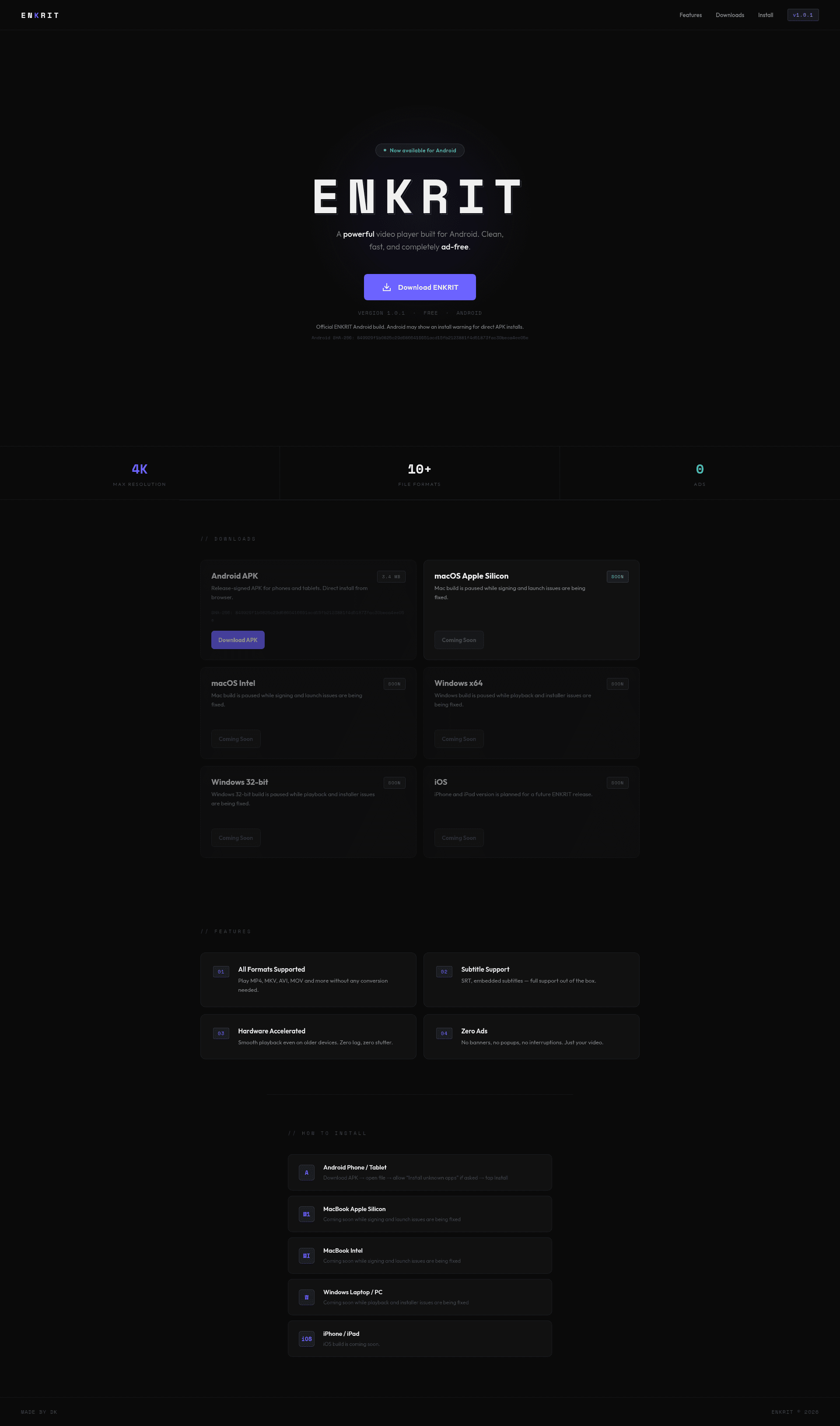
ENKRIT
A clean, ad-free Android video player with subtitle support and hardware acceleration.
Tagline
Play local videos without ads
The no-distraction Android player for local files.
A simpler VLC alternative for Android.
Built for sideloaded videos on Android phones and tablets.
ENKRIT is the no-distraction Android player for people who just want their files to play.
The product’s strongest differentiator is simplicity: broad format support, subtitles, and no ads. This is a clean anti-clutter message that fits the current page exactly.
A lightweight VLC alternative for Android users who want a simpler, ad-free experience.
VLC is the obvious benchmark for format support. ENKRIT can position itself as less intimidating and less cluttered, especially for users who do not need VLC’s depth.
The video player for sideloaded content on Android phones and tablets.
The APK-first distribution and local file support suggest an audience that downloads and manages media manually, not streaming subscribers. This angle matches the actual install flow and feature set.
Primary user
Android users who sideload or manage local video files on their phone/tablet and want a simple ad-free player
ICP #1
Android power user who stores downloaded movies and shows locally on a phone or tablet
Pain
Their default media player chokes on MKV/AVI files, subtitles are broken or annoying to enable, and free players bombard them with ads.
Why this solves
ENKRIT explicitly supports multiple formats, subtitle files, and embedded subs while promising zero ads and smooth playback.
ICP #2
Budget-conscious viewer using an older midrange Android device
Pain
Video playback stutters on weak hardware, especially with high-resolution files, and most lightweight players still push ads or upgrades.
Why this solves
ENKRIT directly addresses the format mismatch with broad codec/file support and a frictionless APK install for Android.
ICP #3
Anime or foreign-film watcher who relies on subtitles for every download
Pain
Subtitles are often inconsistent across players, and many free apps clutter the viewing experience with interruptions.
Why this solves
ENKRIT highlights SRT and embedded subtitle support plus an ad-free interface, making it a cleaner option for subtitle-first viewing.
Strengths
- +The value prop is immediately clear: Android video player, ad-free, broad format support.
- +The feature list is concrete and believable, especially the specific formats and subtitle support.
- +The install/download section removes ambiguity by telling users exactly how to get the APK.
Weaknesses
- −It is far too generic visually and verbally; nothing explains why ENKRIT beats VLC, MX Player, or native players.
- −There is no proof of playback quality, benchmark, screenshots, or demo video, so the 'powerful' claim feels unsupported.
- −The page barely speaks to a real user scenario, so the marketing is feature-only and not outcome-driven.
- −The roadmap section is mostly 'coming soon' and could undermine confidence by foregrounding unfinished desktop/iOS builds.
- −The branding is thin: there is no clear story, no creator credibility, and no reason to trust a direct APK beyond the SHA-256 hash.
Fix these
- Add a head-to-head comparison against VLC and MX Player focused on ad-free experience, subtitle handling, and simplicity.
- Show screenshots or a short playback demo featuring MKV, subtitles, and smooth performance on a low-end Android device.
- Rewrite the hero around a specific use case, such as 'Play your downloaded movies and anime without ads or format headaches.'
- Move unfinished desktop/iOS builds lower on the page or into a separate roadmap section so the Android launch stays the focus.
- Add trust signals: app screenshots, privacy statement, permissions summary, and a clearer explanation of why sideloading is safe.
Drop-in replacement copy
Headline
Play local videos. No ads.
Clean Android playback for MP4, MKV, AVI, MOV, and subtitles.
Open your files without conversion
Play common local video formats like MP4, MKV, AVI, and MOV directly on Android. No extra steps, no file-wrangling, no waiting for a format to “work later.”
Subtitles that actually stay usable
ENKRIT supports SRT files and embedded subtitles, so foreign films, anime, and downloaded TV episodes stay watchable. You do not have to fight the app just to turn captions on.
Smoother playback on real devices
Hardware acceleration helps videos play more smoothly, especially on older phones and tablets. That means less stutter and less frustration when you just want to watch.
Zero ads, zero noise
No banners. No popups. No interruptions between you and the file you already downloaded. ENKRIT keeps the interface minimal so playback stays the focus.
FAQ
What files does ENKRIT support?
It supports common local formats like MP4, MKV, AVI, and MOV, plus other standard Android-playable files. If you already have the video on your device, ENKRIT is meant to open it directly.
Does it support subtitles?
Yes. ENKRIT supports SRT files and embedded subtitles. It is built for people who rely on subtitles every time they watch.
Is it really free and ad-free?
Yes. ENKRIT is free to use and does not show banners or popups. The app is designed to stay out of your way.
Will it work on older Android phones or tablets?
It is designed with hardware acceleration to help playback run more smoothly on weaker devices. It should be a better fit than heavy players on older hardware.
Why install an APK directly?
Because ENKRIT is built for Android users who sideload or manage local media manually. Direct APK install makes it fast to get started without app store friction.
Built ENKRIT because I was tired of Android video players that choke on MKV, bury subtitle settings, or shove ads between every tap. ENKRIT is free, ad-free, and made for local files. MP4, MKV, AVI, MOV. SRT and embedded subs. Hardware acceleration. APK: enkrit.com
Hot take: most people don’t need a giant media app. They need a clean Android player that opens downloaded movies, anime, and TV episodes without drama. That’s ENKRIT: - ad-free - subtitle support - hardware-accelerated playback - direct APK install
Most launches start with marketing. I started with one annoying problem: local videos on Android are still annoying. So I built ENKRIT around the boring stuff that matters: fast open, subtitle support, smooth playback, no ads. v1.0.1 is live.
No banners. No popups. No "watch this ad to continue." ENKRIT is a video player for Android people who just want their files to play. If you store movies, anime, or offline episodes on your phone, this is for you. Free APK: enkrit.com
If your default player fails on MKV, subtitles, or older phones, you already know the pain. ENKRIT is the simple fix: local playback, subtitle support, hardware acceleration, and zero ads. Made for phones and tablets.
The real price of many Android video players is not money. It is ads, clutter, and random interruptions. ENKRIT keeps it clean: play your local files, load subtitles, and get out. Nothing else.
Demo idea I kept building toward: open MKV -> load SRT -> play smoothly on Android -> no ad overlays. That was the whole point of ENKRIT. If you want a simple player for downloaded files, try it here: enkrit.com
ENKRIT supports SRT and embedded subtitles because that is what subtitle-first viewers actually need. No weird maze of menus. No interruptions. No forced upsells. Just open the file and watch.
The most common request for Android media apps is embarrassingly simple: make it ad-free. That is the entire promise behind ENKRIT. Fast playback. Subtitle support. APK install. Clean UI. If you’ve been burned by bloated players, this is for you.
A lot of media apps are built like everyone has a flagship phone. They don’t. ENKRIT is tuned for smoother playback on real Android devices, including older ones. If your current player stutters, this is worth testing.
Angle: problem-solution for local media playback
I built ENKRIT for a very specific problem: Android video players are often too cluttered for something that should be simple. If you have downloaded movies, anime, or TV episodes on your phone or tablet, you probably do not want a giant app with ads, popups, and weird setup flows. You want the file to open. You want subtitles to work. You want playback to be smooth. That is the entire product. ENKRIT supports common local formats like MP4, MKV, AVI, and MOV. It handles SRT and embedded subtitles. It uses hardware acceleration to keep playback smooth, even on weaker devices. It is also free and ad-free. I am launching v1.0.1 because this is already useful as a simple Android media player, and I wanted to ship the thing people actually need instead of bloating it first. If you care about local playback on Android, I’d love feedback from people who sideload media regularly.
Angle: positioned against cluttered alternatives
There is a weird gap in Android media players. On one side, you have apps that are powerful but cluttered. On the other, you have lightweight players that fall apart on subtitles, odd formats, or older devices. ENKRIT is trying to sit in the middle. It is built for people who store video files locally and just want them to play without friction. That means: • broad format support • subtitle support • hardware-accelerated playback • no ads • direct APK install I am not trying to beat every feature in VLC. I am trying to be the simpler choice for people who do not want a media app to feel like software project management. If you are someone who manages offline media on Android, I would love to know what your current player gets wrong.
Angle: maker story and trust
Most product pages overcomplicate this category. They talk about codecs, specs, and roadmap items before they answer the real question: will this play my file, with subtitles, without annoying me? That is what I wanted ENKRIT to answer clearly. I built it as a free, ad-free Android video player for local files because that is still a frustratingly common use case: people download videos, archive shows, keep anime offline, or watch on older tablets where performance matters. The app supports MP4, MKV, AVI, MOV, SRT, and embedded subtitles. It also uses hardware acceleration, which matters more than people think when playback stutters on weaker devices. I am intentionally keeping the experience minimal. No banners. No popups. No extra noise. If you try it, I would especially want feedback on two things: format compatibility and subtitle handling.
No visuals for this kit yet.
Tagline
Ad-free Android video player for local files
Description
ENKRIT plays local videos on Android without ads or clutter. It supports MP4, MKV, AVI, MOV, SRT, embedded subtitles, and hardware-accelerated playback for smoother viewing on phones and tablets.
Maker's first comment
I built ENKRIT because I kept running into the same annoying thing: I would download a video, open it on Android, and then deal with a player that was either bloated, ad-heavy, or weird about subtitles. For something so basic, it felt too hard to just watch a local file. So I made the version I wanted to use myself: free, ad-free, and focused on local playback. It supports common formats like MP4, MKV, AVI, and MOV, plus SRT and embedded subtitles. I also tuned it around hardware acceleration so it feels better on older phones and tablets, not just flagship devices. This is v1.0.1, so I’m not pretending it solves everything. What I care about right now is whether it cleanly handles the files people already have and whether the subtitle experience feels obvious instead of annoying. If you test it, I’d love feedback on playback smoothness, subtitle handling, and any formats that still fail.
Pinned maker comment
Would love feedback on real-world playback: MKV, subtitles, older devices, and any file types that still fail. Also curious if the APK install flow feels trustworthy enough for first-time users.
Meta
If VLC feels too busy, try this.
Targeting Android users who keep movies, anime, or TV episodes offline and want a cleaner player. Hypothesis: people who hate ads and clutter will switch to a simpler app if it opens their files fast and handles subtitles without friction. ENKRIT plays MP4, MKV, AVI, MOV, SRT, and embedded subs on phones and tablets.
Google Search
Ad-free Android video player for MKV
Targeting searchers looking for a lightweight local video player that handles MKV, subtitles, and older Android devices. Hypothesis: users comparing VLC, MX Player, and native players want a simpler option if it removes ads and plays local files smoothly. ENKRIT is free and ad-free.
Reddit Promoted
Your phone already has the movie.
Targeting r/Android and r/SideProject users who sideload media and care about local playback. Hypothesis: people frustrated by ad-filled players will try a focused alternative if it supports common formats, subtitles, and direct APK install. ENKRIT is built for Android phones and tablets.
Subreddits
r/Android
Ask for feedback on a clean ad-free local video player for Android, emphasizing subtitle handling and older-device playback.
Rules: Read the rules carefully; avoid obvious self-promo, lead with a useful question or comparison, and be ready to answer technical questions in comments.
r/SideProject
Share the story of building a simpler Android player because existing apps were too cluttered for local playback.
Rules: Show what you built and what you learned; founders should frame it as a build log, not a launch blast.
r/indiehackers
Post a short founder story about shipping a niche utility app and what validated the idea.
Rules: Focus on the process and distribution lessons; self-promo is tolerated when there is real context and discussion value.
r/movies
Ask how people manage offline movie files on mobile and whether ad-free subtitle-friendly players matter.
Rules: Avoid direct promotion; ask for pain points and mention your app only as context in a comment if asked.
r/anime
Ask about the best Android setup for watching downloaded episodes with reliable subtitles.
Rules: No hard sell; the post should be about workflow and subtitle pain, not the product itself.
Communities
Post the build story, then reply with specifics about format support, APK distribution, and how you tested playback on older devices.
Comment on related launches, ask for feedback on onboarding and trust signals, and only share ENKRIT when the conversation is directly relevant.
Engage in discussions about media players and local playback pain; be useful first and only mention ENKRIT when someone asks for alternatives.
Cold outreach template
{firstName}, I built ENKRIT for people who keep local movies/anime on Android and want a cleaner player. If {context} is something you care about, I’d love your blunt feedback on subtitle handling and playback smoothness. If it’s useful, I can send the APK and you can tell me what breaks.
Product Hunt timing
Launch on Tuesday at 12:01 AM PST. That gives you the full weekday window for discovery, and Android utility apps do better when people can test them during work hours on their phones and then follow up in the evening with real files and subtitles.
Indie Hackers post ideas
- 01I built an Android video player because subtitle support kept failing
- 02What I learned shipping an ad-free APK-first app
- 03How I’m validating a niche Android utility with real users
Competitor alternatives
Current tone of voice
Minimal, utility-first, and slightly promotional; examples include 'A _powerful_ video player built for Android' and 'Clean, fast, and completely _ad-free_.'
Your kit is ready. Sign up free to unlock, takes 10 seconds.
7 more X posts · 2 LinkedIn · Product Hunt copy · ad hooks · 100-user playbook · landing critique