
Fillr
Chrome extension that auto-sorts your tabs into workspaces to keep you in flow.
Tagline
Tabs sort themselves. You stay in flow.
Browser-native workspaces for people who live in tabs.
Not folders. Intelligence for your browser.
Stop tab hunting. Fillr keeps work together.
Fillr is the browser-native workspace layer for people who live in tabs.
This is the strongest category-defining angle because the product is not a generic organizer; it’s explicitly about turning browser activity into persistent workspaces with minimal setup.
Stop using manual tab folders—Fillr auto-organizes the work behind your tabs.
The page repeatedly contrasts itself with folders, so the alternative-to-angle is sharp and believable. It’s especially persuasive against browser-native tab groups and bookmark folders, which still require manual discipline.
Fillr kills tab hunting before it starts.
The landing page uses hard productivity claims like “70%+ less tab hunting” and “50%+ fewer distractions,” so pain-killer messaging around reducing search friction matches the current value proposition and user anxiety.
Primary user
College student or early-career job seeker juggling LinkedIn, Indeed, Handshake, Gmail, and resume tabs in Chrome
ICP #1
College senior applying to 20+ jobs a week across LinkedIn, Handshake, and Indeed
Pain
They keep losing track of open tabs for different applications, resume versions, and networking follow-ups, which creates anxiety and wastes time every time they reopen Chrome.
Why this solves
Fillr explicitly detects job-search behavior and groups tabs into a saved Job Search workspace, so the student doesn’t have to manually curate folders or remember where each application lived.
ICP #2
Frontend engineer at a startup who regularly bounces between GitHub, Cursor, Vercel, Notion, and docs
Pain
Their browser turns into a chaos strip of active tasks, and context switching between coding, docs, and deployment work destroys momentum.
Why this solves
Fillr’s browser-level grouping lets them keep coding-related tabs together automatically, which is more useful than manual bookmarks or generic tab folders because it follows how they actually work.
ICP #3
Solo founder or creator running research, outreach, content, and admin from one laptop
Pain
They use the same browser profile for everything, so work tabs get mixed with personal browsing, making it hard to return to a task without re-assembling the whole context.
Why this solves
Fillr’s workspace concept is a lighter-weight alternative to building separate profiles or using complex productivity systems, and the “saved forever” cloud sync makes recurring projects easy to reopen.
Strengths
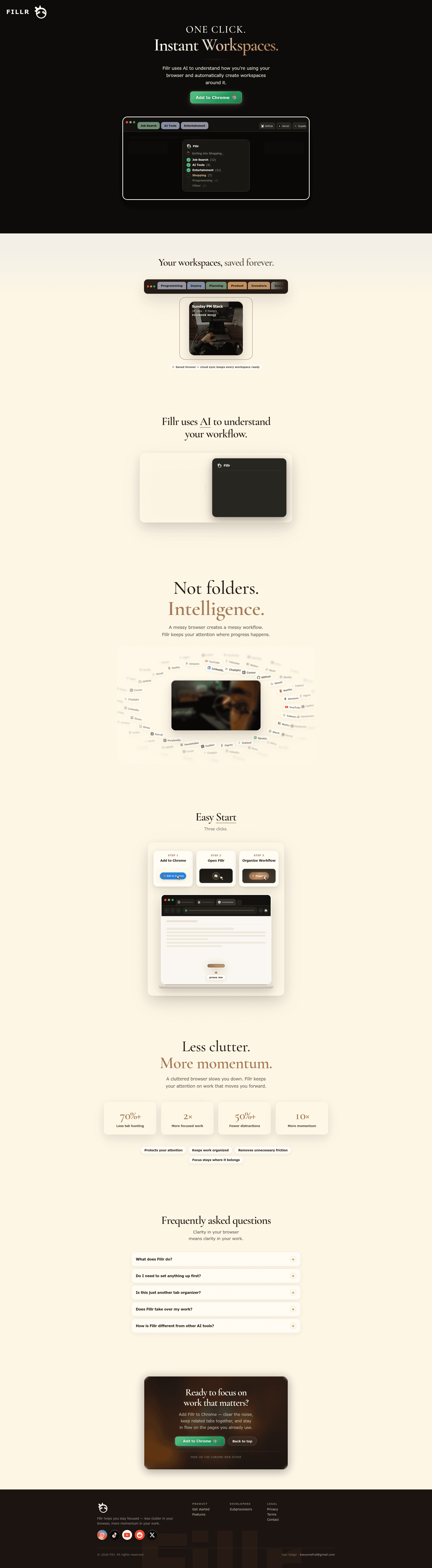
- +The product demo is highly legible: it immediately shows messy tabs turning into categorized workspaces like Job Search, Programming, and AI Tools.
- +The page does a good job anchoring to concrete workflow examples, especially job search with LinkedIn, Handshake, Indeed, and a PDF resume.
- +The promise is easy to understand in one line: fewer tabs, less clutter, more momentum.
Weaknesses
- −It overuses vague AI language without proving what the AI actually does. “Uses AI to understand how you’re using your browser” sounds clever but doesn’t explain the mechanism or output.
- −The product looks like a tab organizer at first glance, and the “Not folders. Intelligence.” line is strong but not enough to fully differentiate against Workona, Toby, or Chrome Tab Groups.
- −The claims are unsupported. Numbers like “70%+ less tab hunting” and “10× more momentum” read like marketing fluff unless backed by real data or a case study.
- −The page is broad to the point of fuzzy. It shows job search, programming, shopping, entertainment, and marketing, but doesn’t commit to the highest-value wedge.
- −The CTA is repetitive but not persuasive; it says “Add to Chrome” a lot without offering a reason to click beyond the generic promise of focus.
Fix these
- Nail a single wedge first, likely job search or developer workflows, and make the landing page speak directly to that persona instead of showcasing every possible use case.
- Replace vague AI claims with a concrete explanation of what gets detected, how workspaces are formed, and what users can edit or override.
- Add a real before/after demo or screen recording showing tabs being classified into a workspace, because this product needs proof, not adjectives.
- Swap the generic productivity metrics for one sharp proof point, such as time saved during job hunting or reduced reopening of the same tabs week after week.
- Differentiate clearly from Tab Groups, Toby, and Workona by explaining what happens automatically, what persists in cloud sync, and why Fillr is better for recurring workflows.
Drop-in replacement copy
Headline
Tabs sort themselves.
Fillr turns browser activity into saved workspaces automatically.
Keep related work in one place
Fillr groups your tabs into workspaces like Job Search, Programming, and Research as you browse. You stop hunting for old tabs and start where you left off.
Skip the manual setup
No folders to build and no system to maintain. Install the extension and let Fillr learn the shape of your work from normal browser behavior.
Bring back context later
Your workspaces are saved to the cloud, so the browser state you need is there when you return. That matters when you reopen the same project every day or week.
Built for how people actually work
Fillr is for people living in Chrome all day: job seekers, engineers, founders, and creators. It reduces tab hunting without making you manage another productivity system.
FAQ
How is this different from Chrome tab groups?
Chrome tab groups are manual. Fillr groups tabs automatically based on how you browse, then saves those workspaces so you can return later.
Do I have to set up categories first?
No. Fillr works without setup and creates workspaces from your activity. You can edit or override them if you want.
What kinds of workspaces does it detect?
Common ones include Job Search, Programming, AI Tools, Marketing, School, Design, Finance, and Shopping. The exact workspace depends on the sites and patterns you use.
Is my browser data saved forever?
Workspaces are saved to the cloud so you can reopen them later. The product is designed around persistence, not temporary tab cleanup.
Who is Fillr for right now?
The strongest wedge is job seekers and early-career knowledge workers who keep too many related tabs open. It also works well for engineers, freelancers, and solo founders.
Every time you reopen Chrome and see 42 tabs, you lose 10 minutes just figuring out what matters. Fillr auto-sorts tabs into workspaces like Job Search, Programming, and AI Tools so you can get back to work.
Open a messy browser. Fillr watches the pattern, groups the tabs, and saves the whole thing as a workspace. LinkedIn + Indeed + resume = Job Search. GitHub + Cursor + docs = Programming. No setup. Just install and keep moving.
I kept building browser tools and realized the real problem wasn't tabs. It was context. People don't want to organize tabs. They want to return to the exact work state they left. That's what Fillr is for.
Built Fillr for people who live in Chrome all day. It auto-creates workspaces from your browsing behavior and keeps them saved in the cloud. Job search, coding, research, shopping. One click. Instant workspaces.
The moment a tool asks you to manage it, it loses. Fillr works because it disappears into the browser and quietly keeps your work grouped. That’s the whole point: less tab hunting, more doing.
The hidden cost of browser chaos isn't clutter. It's switching contexts, reopening the same links, and rebuilding work from memory. Fillr keeps related tabs together automatically, so your browser stops fighting you.
LinkedIn. Handshake. Indeed. Gmail. Resume PDF. Fillr sees the pattern and turns it into a saved Job Search workspace automatically. That means less hunting for tabs and less panic when you come back later.
Fillr is a Chrome extension that turns browser activity into persistent workspaces. No folders to manage. No setup ritual. Just install it and let it sort your tabs into the work you’re already doing.
I’m not trying to solve every browser problem on day one. The first wedge is simple: help job seekers and knowledge workers stop losing track of active work. If Fillr wins that, the rest becomes obvious.
They want fewer decisions. That’s why Fillr works better than another folder system: it classifies your work for you and saves it for later. Browser organization, without the admin job.
Angle: job seekers losing context across applications
The browser is where job searching actually happens. Not in a spreadsheet. Not in a productivity app. It happens in Chrome, with LinkedIn, Handshake, Indeed, Gmail, resume drafts, and company tabs all open at once. The problem is not that students are disorganized. The problem is that browser tabs are a terrible place to hold context. You close your laptop, come back tomorrow, and spend 15 minutes rebuilding the same setup. Then you miss a follow-up. Then you forget which resume version you sent. Then the whole thing feels heavier than it should. That is what I built Fillr to fix. It automatically groups tabs into workspaces like Job Search, saves them to the cloud, and brings the context back without setup. I wanted something that feels closer to how people actually work: open browser, do task, leave, return later without starting over. If you’re applying to jobs right now, I’d love feedback from you. What would make browser-based job search feel less chaotic?
Angle: browser-native workspace layer for knowledge workers
Most tab tools are really storage tools. They help you park tabs somewhere else. That’s useful, but it’s not the core problem. The core problem is that people work in browser states. A coding state. A research state. A client work state. A job search state. And when those states get mixed together, you lose momentum. Fillr is my attempt at a browser-native workspace layer. It watches how you use Chrome, groups related tabs automatically, and saves those workspaces so they’re there when you need them again. No ritual. No manual sorting. No “I’ll organize this later” lie. I think this matters because knowledge workers are already living in tabs. The browser is the operating system. The question is whether it helps you stay in flow or constantly interrupts it. Would love to hear what you use today to keep active work separated. If you’ve tried Workona, Toby, tab groups, or just chaos, what actually stuck?
Angle: anti-manual organization and clear differentiation
A lot of productivity products ask you to become a manager of your own tools. That’s the wrong ask. If a tab organizer needs discipline to use, it will lose to the browser. The browser is where attention goes to die. Fillr is built on a simpler idea: the product should do the organizing. It detects patterns in your browsing and turns them into workspaces like Job Search, Programming, Marketing, School, and Shopping. Those workspaces are saved in the cloud, so you can reopen them later instead of rebuilding them every time. That’s the difference I care about: - not bookmarks - not manual folders - not another place to maintain Just less tab hunting. Less reopening the same links. Less friction between “I have to do this” and “I’m already doing it.” I’m curious: do you think browser organization should be explicit, where you manually label everything, or implicit, where the tool learns from behavior? That answer probably decides the product.
No visuals for this kit yet.
Tagline
Auto-sorts Chrome tabs into workspaces
Description
Fillr is a Chrome extension that groups your tabs into workspaces like Job Search, Programming, and AI Tools. It saves them to the cloud, so you can return to the exact context later without rebuilding your browser.
Maker's first comment
I built Fillr because I kept losing work inside Chrome. As a founder and user, I was constantly reopening the same tabs, switching contexts, and wasting time just trying to remember what belonged together. What pushed me to ship this was seeing how often the browser becomes the place where real work happens: job search, coding, research, outreach, client work. But Chrome gives you almost nothing for managing that reality unless you manually stay on top of folders and tab groups. Fillr tries to fix that by doing the organizing for you. It watches browser behavior, groups related tabs into workspaces, and saves them so you can come back later without starting from scratch. I’m launching this early and I know it’s not done. I’d especially love feedback on the detection accuracy, the usefulness of the workspace categories, and whether the job-search wedge feels strong enough before expanding to more workflows.
Pinned maker comment
Would love feedback on two things: whether the automatic workspace grouping feels magical or creepy, and which workflow wedge should be the homepage focus first — job search, coding, or solo work.
Meta
Job seekers lose tabs, then momentum.
Hypothesis: college seniors and early-career job seekers will click if the ad promises less tab chaos during active applications. Fillr auto-groups LinkedIn, Indeed, Handshake, Gmail, and resume tabs into a saved Job Search workspace. Install once. Keep your applications together.
Google Search
Auto organize Chrome tabs into workspaces
Hypothesis: people searching for tab organizers want an alternative to manual folders and tab groups. Fillr watches browser behavior, creates workspaces like Programming and Job Search automatically, and saves them to the cloud for later.
Reddit Promoted
Chrome tab chaos is a real productivity leak.
Hypothesis: founders, indie hackers, and knowledge workers in browser-heavy communities will respond to a tool that removes tab hunting without setup. Fillr groups related tabs into workspaces automatically, so you can reopen work later instead of rebuilding it.
Subreddits
r/SideProject
Show the before/after demo of messy tabs turning into Job Search and Programming workspaces
Rules: Share what you built and what you learned; avoid pure promotion and engage in comments
r/indiehackers
Talk about the problem of browser context switching and how you validated the wedge
Rules: Be transparent, share numbers or learnings, and avoid link-only posts
r/microsaas
Frame Fillr as a tiny utility that solves a sharp browser pain for a narrow ICP
Rules: MicroSaaS angle only, no spam, explain the build and niche clearly
r/EntrepreneurRideAlong
Use the job-search wedge to discuss how founders can reduce daily admin friction
Rules: Must be conversational and useful, not a sales pitch
r/cscareerquestions
Target graduating seniors and junior engineers who juggle applications, interview prep, and docs
Rules: Give advice first, product second; self-promo is heavily scrutinized
Communities
Post the build story, the wedge decision, and a short teardown of why tab groups failed. Reply to every comment with specifics.
Share a launch update focused on customer pain and ask for feedback on positioning, not growth hacks.
Launch Fast
Drop the demo, ask for early tester feedback, and participate in other founders' launches before posting your own repeatedly.
Cold outreach template
Hey {firstName} — saw {context} and thought of Fillr. It auto-groups Chrome tabs into workspaces so you don’t lose track of job search, coding, or client work. If you want, I can send you a 30-second demo and you can tell me if it matches how you actually work.
Product Hunt timing
Launch on Tuesday at 12:01 AM Pacific Time. That gives you the full US workday for students, founders, and engineers to discover it, and Tuesday tends to be better than Monday for attention without weekend dropoff.
Indie Hackers post ideas
- 01I built a Chrome extension because I was tired of rebuilding my browser state every day
- 02Why I focused Fillr on job seekers before expanding to developers and founders
- 03What I learned from trying to make tab organization automatic instead of manual
Competitor alternatives
Current tone of voice
Minimal, confident, and productivity-focused with a slightly AI-forward gloss; for example, “Not folders. Intelligence.” and “One Click.Instant Workspaces.”
Your kit is ready. Sign up free to unlock, takes 10 seconds.
7 more X posts · 2 LinkedIn · Product Hunt copy · ad hooks · 100-user playbook · landing critique